Sunday, March 8, 2015

Pixel Pushing Power Perfection

Try saying that title line 10 times over, lol!

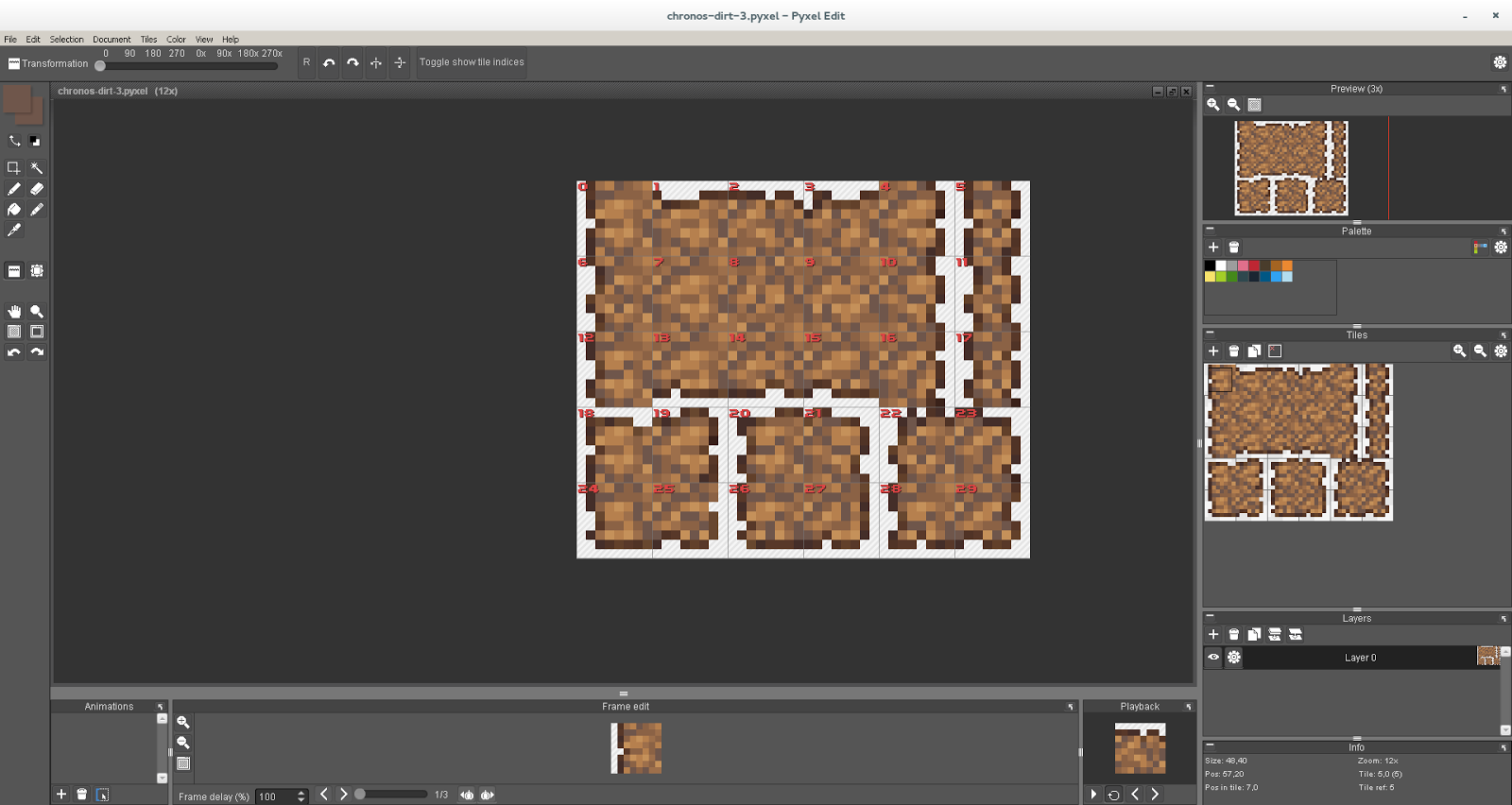
I've gotten to grips with PyxelEdit and have been using it for a new freelance commission for @PixelsoftGames upcoming project Chronos. The workflow is really nice and blows away my old process of working in 3 applications at once to get things done. I'll still need to do some copy/paste magic between PyxelEdit and GIMP for some things, but for the most part, this new tool really fills in gaps in my productivity for pixel based artwork.
A work in progress commission
The tools in PyxelEdit are really tailored to the needs of a pixel artist, and that lets you focus on the creation and not on getting the software to do what you want it to do. What would normally take me a few hours before, now only takes under an hour. Thank you, Daniel Kvarfordt for creating PyxelEdit!


Saturday, March 7, 2015

Pyxel Edit

I purchased PyxelEdit today and I'm watching the tutorials to get up to speed with the software quickly.

Meet puff, the not-so-friendly dragon!
I spent maybe a minute or two at the most doodling this. It's not for anything, I was merely trying out how the control is. I use a mouse, so the amount of lag between my hand movement and the pixels that are drawn are something I need to train a bit with.

The crazy tiled pattern in the background was me playing with the color replacer tool. I've only spent about 30 minutes with PyxelEdit so far, but I am quite impressed with the software. It's well worth the money ($9 USD at the time of this writing) and is available here.

I had planned to work on Pitch some more today, but I had a couple freelance jobs come up, so that takes priority. Gotta pay them bills somehow!

Friday, March 6, 2015

Pitch Alpha

Well after much effort, my little Pitch project is now in Alpha. I need to create the audio content and integrate that into the game, then integrate Unity Ads, and then it's time for a tiny semi-public beta, and then, the release to the masses on the public market places!

I'm excited. For audio, I'm messing around with an amazing little Sampling Studio called Independence by MAGIX, and Reaper for recording the "Inde" VST output. More on this later. I'm exhausted, and heading to bed.

Unity wtf Unity?!

Unity 5 has had me pulling out my hair trying to solve a very simple task. (Animating a sliding menu panel on a button click event) It turns out that somehow the button I created for the task somehow was screwed up. I had recreated the animation stuff at least 7 times and each time I got the wrong results. (Animation played backwards, when it was not being told to do so)

My wife jumped in and just created a new button and linked it up to the animations and everything worked fine. So, re-styled her button like mine, and removed my button, and that completes the scene.

I have spent more time trying to solve this one stupid thing than I've spent on the rest of the game (which is very near to completion now) and it was nothing I did wrong, nothing I could have done to change it, just a stupid fluke in Unity 5's wonderful new UI system. Go figure!

Wednesday, March 4, 2015

Pitch Experiment on Unity

I've decided to focus on developing the experimental project named Pitch with Unity 5 instead of using libgdx. This takes the project into several new fields for me, with using Unity 5 for developing a game, using Unity on android, and putting Unity Ads into a game. I'm not expecting much, but hoping for the best.

That said, I will be putting up some dev progress of Pitch and Flip16 soon. It's been a hectic past few days, and I haven't had as much available time for development as I'd like to have. Today for example was spent away from the office, so pretty much nothing got done... stupid need for groceries and all that...sigh

Tuesday, March 3, 2015

Unity 5 is out!

Well, I watched the live GDC launch event thing for Unity 5 on youtube today and I am really looking forward to trying out the new Unity 5. I am downloading and installing it now. Going to probably be moving Flip16 dev to Unity 5.

Missed a day! Well, sort of...

My crazy sleep schedule has once again become so crazy, that I completely missed being able to post on the 2nd. So a short recap of progress of Flip16.

I managed to figure out what was needed to finish up the main menu scene. Now it's on to designing the level select scene.

I will create a micro-tutorial on how to create a menu scene in Unity using the new UI soonish, and post it up here.

Sunday, March 1, 2015

Streaming on Picarto.TV

I'm going to stream a bit of stuff today on Picarto.TV (Twitch just wasn't working out for me)

You can tune in here https://www.picarto.tv/live/channel.php?watch=RamblingIndie

Going to be working in Inkscape for a little while.

Why is the new Unity UI so insane?

Hello, March 2015. My aren't you a crazy cold one aren't you? (About a foot of snow covers everything as far as I can see out my window...)

Well my first encounter with Unity's new UI has left me searching for answers to something that really shouldn't have been a question. What? The retarded over-sized Canvas that gets drawn in the Scene view. What the hell were the Unity devs thinking?

This sums up the problem with Unity UI Canvas pretty well.

The image above I found in a thread on the Unity forums. Credit to the owner. It is not mine. And I think that it sums up the problem with Unity UI rather perfectly. I'm using the Unity 2D Sprite system to create my game, and then I was going to add the menu using the shiny new UI system, and a hair-pulling, mind-numbing truly baffling situation occurs when one tries to add in a menu. I added in a Button control to my scene, which tosses in the Canvas and EventSystem objects as well. But the Text on the Button never showed up. Why? Because the stupid text was sitting about 4000 pixels off screen!

After a few google searches, I learned that this is the proper behavior of Unity UI. Why? I don't know why. It's stupid. But once you know about this really stupid design, then you can get down to using the seriously powerful and useful Unity UI.